
Home
Visual Data Insights Using SAS ODS Graphics: A Guide to Communication-Effective Visualization
Barnes and Noble
Loading Inventory...
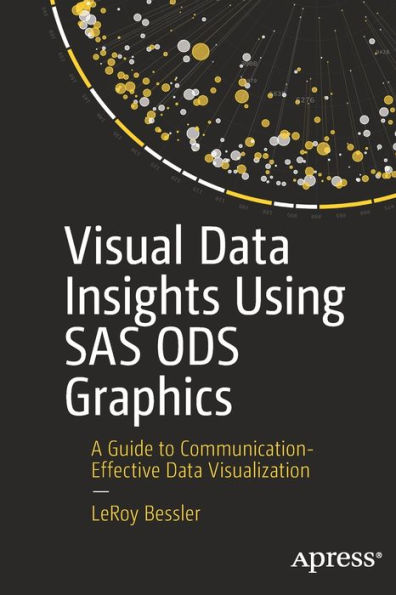
Visual Data Insights Using SAS ODS Graphics: A Guide to Communication-Effective Visualization in Chattanooga, TN
Current price: $64.99
Barnes and Noble
Visual Data Insights Using SAS ODS Graphics: A Guide to Communication-Effective Visualization in Chattanooga, TN
Current price: $64.99
Loading Inventory...
Size: Paperback
SAS ODS graphics users will learn in this book how to visually understand and communicate the significance of data to deliver images for quick and easy insight, with precise numbers.
Many charts or plots require the viewer to run the eye from a bar end or plot point to some point on an axis, and then to interpolate between tick marks to estimate the value. Some design choices can lead to wrong conclusions or mistaken impressions. Graphic software relies on defaults to deliver something if you make a minimal effort, but that something is not likely to be exactly what you want.
Visual Data Insights Using SAS ODS Graphics
provides examples using experience-based design principles. It presents examples of bar charts, pie charts, and trend lines or time series plots, the graph types commonly used in business, other organizations, and the media for visual insight into data. Newer graphs are also included: dot plots, needle plots, waterfall charts, butterflycharts, heat maps, bubble plots, step plots, high-low plots, and donut charts. In addition, there are basic tools of statistics: scatter plots, box plots, histograms, fit and confidence plots, and distributions.
Author LeRoy Bessler introduces unique creations, including sparsely annotated time series, maximally informative bar charts, better box plots, histograms based on interesting atypical rationales, and much more.
The examples use SAS sample data sets as input. Any SAS user can experiment with the code presented to see what else is possible, or adapt it to repurpose the design and apply it with a customized version of that code.
What You’ll Learn
• Create graphs that are easily and quickly interpreted, and without ambiguity
• Supply precise data values that are correct on the graph and correctly associated with the graphic visual elements
• Take advantage of widely applicable (but not necessarily available elsewhere) design examples
• Avoid bad practices that are encouraged by poor examples elsewhere
• Get past sub-optimal designs and results that are built into software defaults
• Take advantage of less familiar capabilities available in the software
Who This Book Is For
SAS software users who want to understand their data and/or visually deliver their results
Many charts or plots require the viewer to run the eye from a bar end or plot point to some point on an axis, and then to interpolate between tick marks to estimate the value. Some design choices can lead to wrong conclusions or mistaken impressions. Graphic software relies on defaults to deliver something if you make a minimal effort, but that something is not likely to be exactly what you want.
Visual Data Insights Using SAS ODS Graphics
provides examples using experience-based design principles. It presents examples of bar charts, pie charts, and trend lines or time series plots, the graph types commonly used in business, other organizations, and the media for visual insight into data. Newer graphs are also included: dot plots, needle plots, waterfall charts, butterflycharts, heat maps, bubble plots, step plots, high-low plots, and donut charts. In addition, there are basic tools of statistics: scatter plots, box plots, histograms, fit and confidence plots, and distributions.
Author LeRoy Bessler introduces unique creations, including sparsely annotated time series, maximally informative bar charts, better box plots, histograms based on interesting atypical rationales, and much more.
The examples use SAS sample data sets as input. Any SAS user can experiment with the code presented to see what else is possible, or adapt it to repurpose the design and apply it with a customized version of that code.
What You’ll Learn
• Create graphs that are easily and quickly interpreted, and without ambiguity
• Supply precise data values that are correct on the graph and correctly associated with the graphic visual elements
• Take advantage of widely applicable (but not necessarily available elsewhere) design examples
• Avoid bad practices that are encouraged by poor examples elsewhere
• Get past sub-optimal designs and results that are built into software defaults
• Take advantage of less familiar capabilities available in the software
Who This Book Is For
SAS software users who want to understand their data and/or visually deliver their results
SAS ODS graphics users will learn in this book how to visually understand and communicate the significance of data to deliver images for quick and easy insight, with precise numbers.
Many charts or plots require the viewer to run the eye from a bar end or plot point to some point on an axis, and then to interpolate between tick marks to estimate the value. Some design choices can lead to wrong conclusions or mistaken impressions. Graphic software relies on defaults to deliver something if you make a minimal effort, but that something is not likely to be exactly what you want.
Visual Data Insights Using SAS ODS Graphics
provides examples using experience-based design principles. It presents examples of bar charts, pie charts, and trend lines or time series plots, the graph types commonly used in business, other organizations, and the media for visual insight into data. Newer graphs are also included: dot plots, needle plots, waterfall charts, butterflycharts, heat maps, bubble plots, step plots, high-low plots, and donut charts. In addition, there are basic tools of statistics: scatter plots, box plots, histograms, fit and confidence plots, and distributions.
Author LeRoy Bessler introduces unique creations, including sparsely annotated time series, maximally informative bar charts, better box plots, histograms based on interesting atypical rationales, and much more.
The examples use SAS sample data sets as input. Any SAS user can experiment with the code presented to see what else is possible, or adapt it to repurpose the design and apply it with a customized version of that code.
What You’ll Learn
• Create graphs that are easily and quickly interpreted, and without ambiguity
• Supply precise data values that are correct on the graph and correctly associated with the graphic visual elements
• Take advantage of widely applicable (but not necessarily available elsewhere) design examples
• Avoid bad practices that are encouraged by poor examples elsewhere
• Get past sub-optimal designs and results that are built into software defaults
• Take advantage of less familiar capabilities available in the software
Who This Book Is For
SAS software users who want to understand their data and/or visually deliver their results
Many charts or plots require the viewer to run the eye from a bar end or plot point to some point on an axis, and then to interpolate between tick marks to estimate the value. Some design choices can lead to wrong conclusions or mistaken impressions. Graphic software relies on defaults to deliver something if you make a minimal effort, but that something is not likely to be exactly what you want.
Visual Data Insights Using SAS ODS Graphics
provides examples using experience-based design principles. It presents examples of bar charts, pie charts, and trend lines or time series plots, the graph types commonly used in business, other organizations, and the media for visual insight into data. Newer graphs are also included: dot plots, needle plots, waterfall charts, butterflycharts, heat maps, bubble plots, step plots, high-low plots, and donut charts. In addition, there are basic tools of statistics: scatter plots, box plots, histograms, fit and confidence plots, and distributions.
Author LeRoy Bessler introduces unique creations, including sparsely annotated time series, maximally informative bar charts, better box plots, histograms based on interesting atypical rationales, and much more.
The examples use SAS sample data sets as input. Any SAS user can experiment with the code presented to see what else is possible, or adapt it to repurpose the design and apply it with a customized version of that code.
What You’ll Learn
• Create graphs that are easily and quickly interpreted, and without ambiguity
• Supply precise data values that are correct on the graph and correctly associated with the graphic visual elements
• Take advantage of widely applicable (but not necessarily available elsewhere) design examples
• Avoid bad practices that are encouraged by poor examples elsewhere
• Get past sub-optimal designs and results that are built into software defaults
• Take advantage of less familiar capabilities available in the software
Who This Book Is For
SAS software users who want to understand their data and/or visually deliver their results
You May Also Like













More About Barnes and Noble at Hamilton Place
Barnes & Noble is the world’s largest retail bookseller and a leading retailer of content, digital media and educational products. Our Nook Digital business offers a lineup of NOOK® tablets and e-Readers and an expansive collection of digital reading content through the NOOK Store®. Barnes & Noble’s mission is to operate the best omni-channel specialty retail business in America, helping both our customers and booksellers reach their aspirations, while being a credit to the communities we serve.
2100 Hamilton Pl Blvd, Chattanooga, TN 37421, United States
Find Barnes and Noble at Hamilton Place in Chattanooga, TN
Visit Barnes and Noble at Hamilton Place in Chattanooga, TN