
Home
365 Family 2025 (6-User License, 12-Month Subscription, Product Key Code)
Electronic Express
Loading Inventory...


365 Family 2025 (6-User License, 12-Month Subscription, Product Key Code) in Chattanooga, TN
By Microsoft
Current price: $99.99
Original price: $169.99
Electronic Express
365 Family 2025 (6-User License, 12-Month Subscription, Product Key Code) in Chattanooga, TN
By Microsoft
Current price: $99.99
Original price: $169.99
Loading Inventory...
Microsoft 365 Family is a subscription for one to six people that includes advanced security, cloud storage, and innovative apps with AI.
Unlock Your Creativity
Discover new skills and do more than what you can dream of with AI-powered features1 in Microsoft 365. Edit family photos and videos like a pro, turn simple ideas into stunning designs fast, and overcome writer’s block with confidence and ease.
Strong Security for Your Peace of Mind
Effortlessly protect your family’s precious photos, important documents, and emails,2 plus your phone and computer with easy-to-use tools and features in Microsoft 365 that help safeguard your digital lives.
Make Daily Tasks Easier
Keep up with your day, every day with AI-powered features in Microsoft 365.1 Seamlessly tackle your to-dos and easily track family budgets, projects, and calendars. Use your phone, laptop, or tablet to make and share plans, get organized, and stay on top—no matter where the day takes you.
Powerful Productivity Apps with Microsoft Copilot
Redefine what’s possible with Microsoft Copilot¹ alongside you in Word, Excel,3 PowerPoint, and OneNote. Collaborate in real time, work offline, and get design, writing, and speaking suggestions in each app.
Up to 6 TB of Cloud Storage (1 TB Per Person)
Each person you share the subscription with gets 1 TB (1000 GB) of secure storage for their photos, files, videos, emails, and more. And everyone can easily manage their storage anytime, on any device.
All-in-One Online Security for the Whole Family
Easily keep your family’s phones, computers, and privacy safer online with Microsoft Defender. Stay one step ahead of hackers and scammers with identity theft4 and credit monitoring,5 and continuous device scanning6 for viruses, malicious apps, and ransomware.
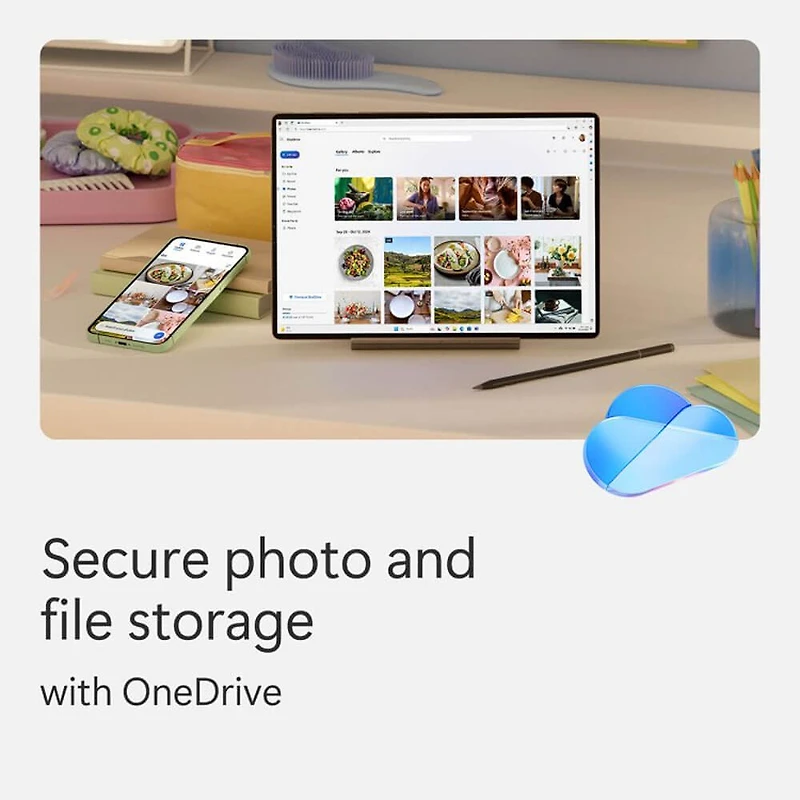
Secure Photo and File Storage
Each person can securely save their photos and files in their own personal OneDrive with built-in ransomware detection and file recovery.7 They can easily access files across devices and protect what’s most important in a Personal Vault folder secured with two-step identity verification.
Design and Edit with AI
Create, design, and edit where and when you need it with Microsoft Designer and the power of generative AI.1 Make eye-catching images using only your words, craft next-level designs that pop, and even edit photos like an expert.
Video Editor with Premium Filters and Effects
Create and edit beautiful videos with ease using Clipchamp’s robust tools, intuitive controls, templates,8 and an extensive stock library.
Ad-Free Secure Email with Copilot
Everyone can easily manage their own email accounts and calendars in Outlook with built-in security tools² that keep their information protected. Subscription owners can use Copilot to draft emails and summarize longer threads.19
All-Day Video Calling
Join group calls and talk for up to 30 hours with up to 300 people with Microsoft Teams.
Quickly Create Forms and Polls
Use Copilot¹ in Forms to generate and rewrite polls and surveys. Easily create and refine your questions, improve response options, and get a detailed analysis of results.
Access (PC Only)
Easily create and manage databases for projects, large or small.
Applications are Always Up to Date
With a Microsoft 365 Family subscription, you get new features and updates as soon as they are released, so you can keep working with the latest and the greatest.
Microsoft Support
Microsoft has your back with Microsoft 365 and Windows 11 technical support readily available to assist whenever you and your family need help.
App availability varies by device/language. Features vary by platform. Minimum age limits may apply to use of AI features. Details.
Features and app availability may vary by region.
Copilot and AI image creation are only available to the subscription owner and usage limits apply.
1 AI features only available to subscription owner and cannot be shared; AI usage limits apply; minimum age limits may apply to subscription activation and use of AI features. Learn more.
2 Security features apply to @outlook.com, @hotmail.com, @live.com, or @msn.com email addresses.
3 Copilot in Excel available to subscription owner and requires AutoSave to be enabled, meaning the file must be saved to OneDrive; it doesn't function with unsaved files.
4 Identity theft and credit monitoring is only available in the United States and US territories.
5 Your device’s primary display language must be set to English.
6 Available on Windows, Mac, iOS, and Android devices. Does not replace existing malware protection on iOS and Windows devices.
7 OneDrive files can be recovered for up to 30 days after malicious attacks, file corruption, or accidental deletions and edits.
8 Clipchamp templates only available in English.
9 Copilot features in Outlook apply to subscription owner accounts with @outlook.com, @hotmail.com, @live.com, or @msn.com email addresses and are available in Outlook.com, Outlook built into Windows, Outlook on Mac, and iOS and Android apps.
- For one to six people
- Each person can use on up to five devices simultaneously
- Works on PC, Mac, iPhone, iPad, and Android phones and tablets
- Up to 6 TB of secure cloud storage (1 TB per person)
- Productivity apps with Microsoft Copilot
- Designer AI-powered image creator and editor
- Clipchamp video editor with premium filters and effects
- Microsoft Defender advanced security for your personal data and devices
- OneDrive ransomware protection for your photos and files
- Ongoing Microsoft support for help when you need it
Microsoft 365 Family is a subscription for one to six people that includes advanced security, cloud storage, and innovative apps with AI.
Unlock Your Creativity
Discover new skills and do more than what you can dream of with AI-powered features1 in Microsoft 365. Edit family photos and videos like a pro, turn simple ideas into stunning designs fast, and overcome writer’s block with confidence and ease.
Strong Security for Your Peace of Mind
Effortlessly protect your family’s precious photos, important documents, and emails,2 plus your phone and computer with easy-to-use tools and features in Microsoft 365 that help safeguard your digital lives.
Make Daily Tasks Easier
Keep up with your day, every day with AI-powered features in Microsoft 365.1 Seamlessly tackle your to-dos and easily track family budgets, projects, and calendars. Use your phone, laptop, or tablet to make and share plans, get organized, and stay on top—no matter where the day takes you.
Powerful Productivity Apps with Microsoft Copilot
Redefine what’s possible with Microsoft Copilot¹ alongside you in Word, Excel,3 PowerPoint, and OneNote. Collaborate in real time, work offline, and get design, writing, and speaking suggestions in each app.
Up to 6 TB of Cloud Storage (1 TB Per Person)
Each person you share the subscription with gets 1 TB (1000 GB) of secure storage for their photos, files, videos, emails, and more. And everyone can easily manage their storage anytime, on any device.
All-in-One Online Security for the Whole Family
Easily keep your family’s phones, computers, and privacy safer online with Microsoft Defender. Stay one step ahead of hackers and scammers with identity theft4 and credit monitoring,5 and continuous device scanning6 for viruses, malicious apps, and ransomware.
Secure Photo and File Storage
Each person can securely save their photos and files in their own personal OneDrive with built-in ransomware detection and file recovery.7 They can easily access files across devices and protect what’s most important in a Personal Vault folder secured with two-step identity verification.
Design and Edit with AI
Create, design, and edit where and when you need it with Microsoft Designer and the power of generative AI.1 Make eye-catching images using only your words, craft next-level designs that pop, and even edit photos like an expert.
Video Editor with Premium Filters and Effects
Create and edit beautiful videos with ease using Clipchamp’s robust tools, intuitive controls, templates,8 and an extensive stock library.
Ad-Free Secure Email with Copilot
Everyone can easily manage their own email accounts and calendars in Outlook with built-in security tools² that keep their information protected. Subscription owners can use Copilot to draft emails and summarize longer threads.19
All-Day Video Calling
Join group calls and talk for up to 30 hours with up to 300 people with Microsoft Teams.
Quickly Create Forms and Polls
Use Copilot¹ in Forms to generate and rewrite polls and surveys. Easily create and refine your questions, improve response options, and get a detailed analysis of results.
Access (PC Only)
Easily create and manage databases for projects, large or small.
Applications are Always Up to Date
With a Microsoft 365 Family subscription, you get new features and updates as soon as they are released, so you can keep working with the latest and the greatest.
Microsoft Support
Microsoft has your back with Microsoft 365 and Windows 11 technical support readily available to assist whenever you and your family need help.
App availability varies by device/language. Features vary by platform. Minimum age limits may apply to use of AI features. Details.
Features and app availability may vary by region.
Copilot and AI image creation are only available to the subscription owner and usage limits apply.
1 AI features only available to subscription owner and cannot be shared; AI usage limits apply; minimum age limits may apply to subscription activation and use of AI features. Learn more.
2 Security features apply to @outlook.com, @hotmail.com, @live.com, or @msn.com email addresses.
3 Copilot in Excel available to subscription owner and requires AutoSave to be enabled, meaning the file must be saved to OneDrive; it doesn't function with unsaved files.
4 Identity theft and credit monitoring is only available in the United States and US territories.
5 Your device’s primary display language must be set to English.
6 Available on Windows, Mac, iOS, and Android devices. Does not replace existing malware protection on iOS and Windows devices.
7 OneDrive files can be recovered for up to 30 days after malicious attacks, file corruption, or accidental deletions and edits.
8 Clipchamp templates only available in English.
9 Copilot features in Outlook apply to subscription owner accounts with @outlook.com, @hotmail.com, @live.com, or @msn.com email addresses and are available in Outlook.com, Outlook built into Windows, Outlook on Mac, and iOS and Android apps.
- For one to six people
- Each person can use on up to five devices simultaneously
- Works on PC, Mac, iPhone, iPad, and Android phones and tablets
- Up to 6 TB of secure cloud storage (1 TB per person)
- Productivity apps with Microsoft Copilot
- Designer AI-powered image creator and editor
- Clipchamp video editor with premium filters and effects
- Microsoft Defender advanced security for your personal data and devices
- OneDrive ransomware protection for your photos and files
- Ongoing Microsoft support for help when you need it
You May Also Like














More About Electronic Express at Hamilton Place
Since 1983 Electronic Express has been a leader in top quality, name brand electronics at exceptionally low prices. If you're looking for the newest in electronic gear for your home, office, car or on-the-go, Electronic Express has it. We at Electronic Express take great pride in providing our customers with leading edge products at prices to fit any budget! At Electronic Express, we stock over 2000 models, so if you see the manufacturer, but not the model, don't be shy - give us a call and we will be happy to check! Whether you are buying on line for the first time or you are an avid e-shopper, Electronic Express wants to make your shopping experience as pleasurable as possible. Be sure to visit our site often, and pay special attention to our Special Offers area as we will be featuring several different items at super low prices every week! For even more personalized service, whenever you're in the Southeast region, please stop by any of our store locations in and around Nashville, Tennessee. Come and see why Electronic Express is the only name you need to know!
2200 Hamilton Pl Blvd, Chattanooga, TN 37421, United States
Find Electronic Express at Hamilton Place in Chattanooga, TN
Visit Electronic Express at Hamilton Place in Chattanooga, TN